Spinoko AI Abilities: Manage Your Casino Website from Claude or ChatGPT
Spinoko 3.2.0 lets AI assistants like Claude or ChatGPT manage your casinos, slots, bonuses and theme options. Here is what the AI abilities can do, shown on the Spinoko demo website.
Spinoko 3.2.0 lets you manage your casino affiliate website from an AI chat. Instead of clicking through the WordPress admin, you ask Claude or ChatGPT to do the job, and it does it on your website.
To show what that looks like in practice, I connected Claude (the chat on claude.ai) to the public Spinoko demo website and gave it a few typical tasks: import a casino, find slots with missing data, update a bonus, change a button label.
How it works
An AI assistant doesn’t click around your dashboard. Instead, Spinoko gives it a list of specific tasks it can do: list and update casinos and slots, add or change bonuses, import from Casino Vault, edit labels and theme options. These tasks are called abilities, and the assistant can’t do anything outside them.
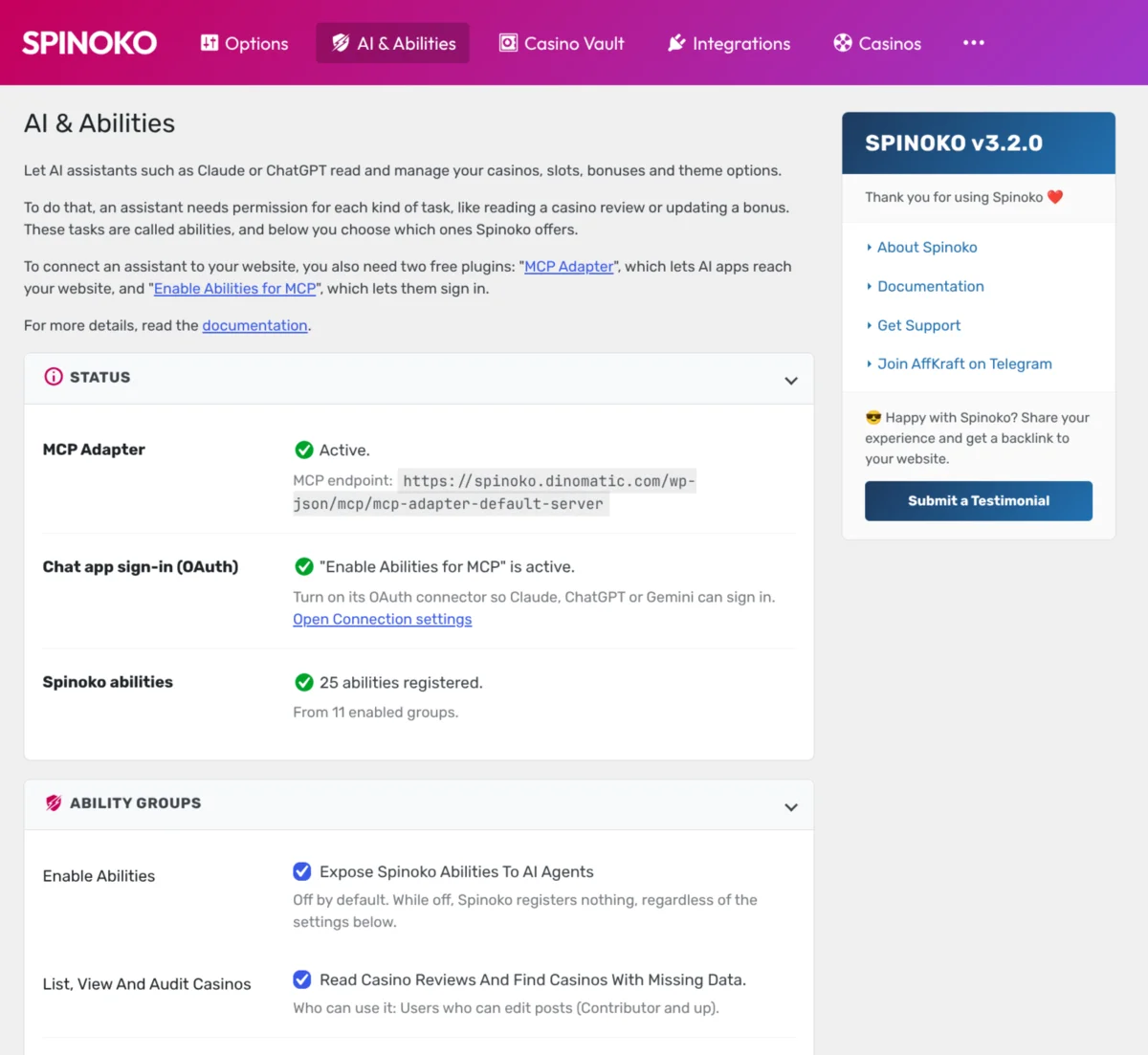
You decide which abilities are available on the new Spinoko → AI & Abilities page: switch them on in groups, or one by one. Everything is off until you turn it on.
To let a chat app reach your website you need two free plugins: “MCP Adapter”, which lets AI apps reach the website, and “Enable Abilities for MCP”, which gives chat apps a way to sign in. I explained the general idea and the connection steps in my guide to managing WordPress with AI agents, so I won’t repeat them here. The Spinoko-specific setup is in the AI documentation.
This is the admin page on my demo website after setup. Both plugins are active, and 25 abilities from 11 groups are switched on.
“What can you do on my Spinoko website?”
I started with the obvious question.
Hey, what you can do on my Spinoko website?
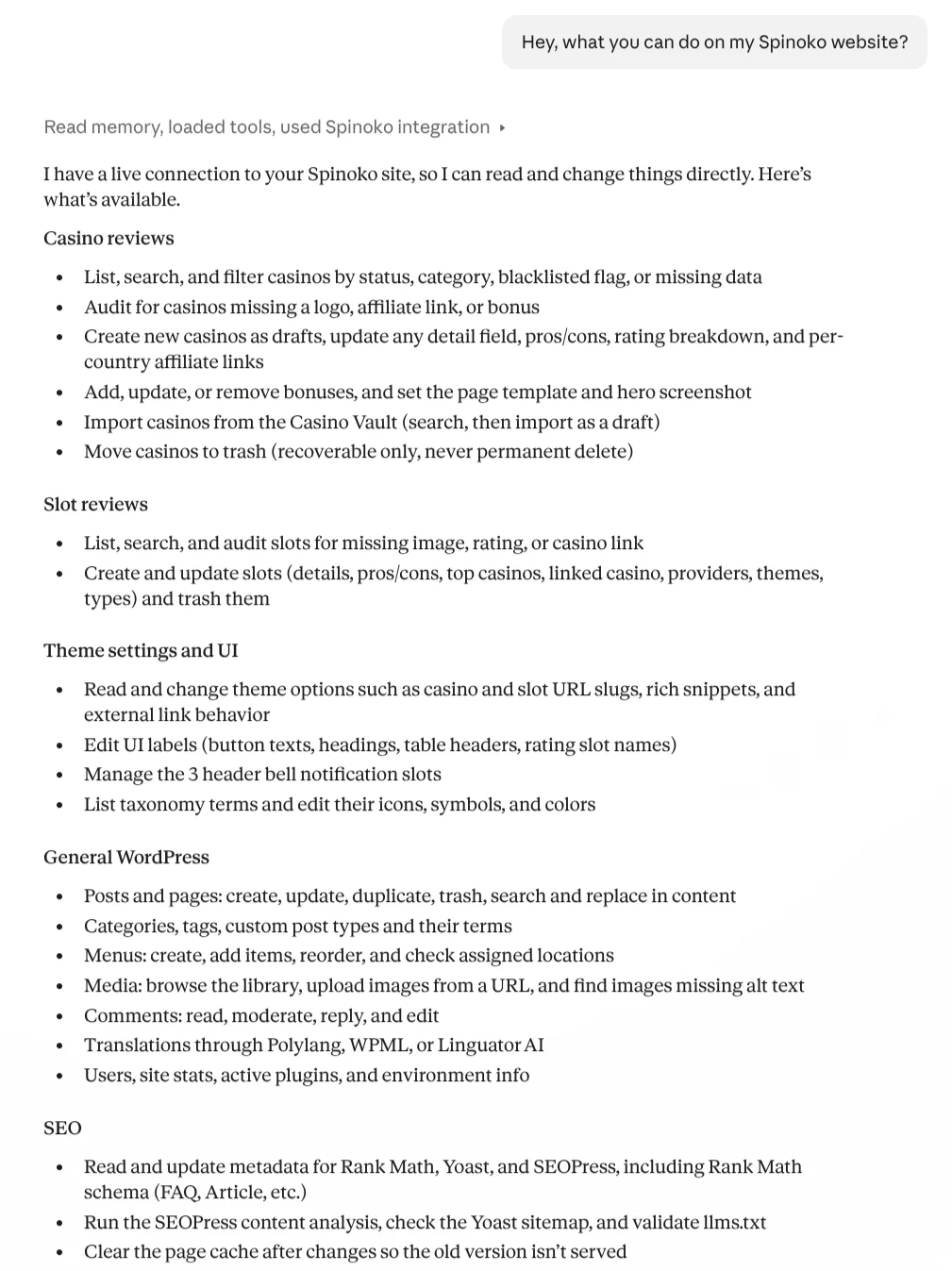
Claude answered with a list grouped by area: casino reviews (list, audit, create drafts, edit bonuses, import from Casino Vault, move to trash), slot reviews, theme settings and button labels, and then general WordPress and SEO tasks. The last two groups come from the “Enable Abilities for MCP” plugin, not from Spinoko. It also noted that trashing is recoverable only, never a permanent delete.
You see exactly what abilities the assistant has been given, which is also a good check that you did not switch on more than you meant to.
Importing a casino from Casino Vault
Search Casino Vault for 20Bet casino and import it.
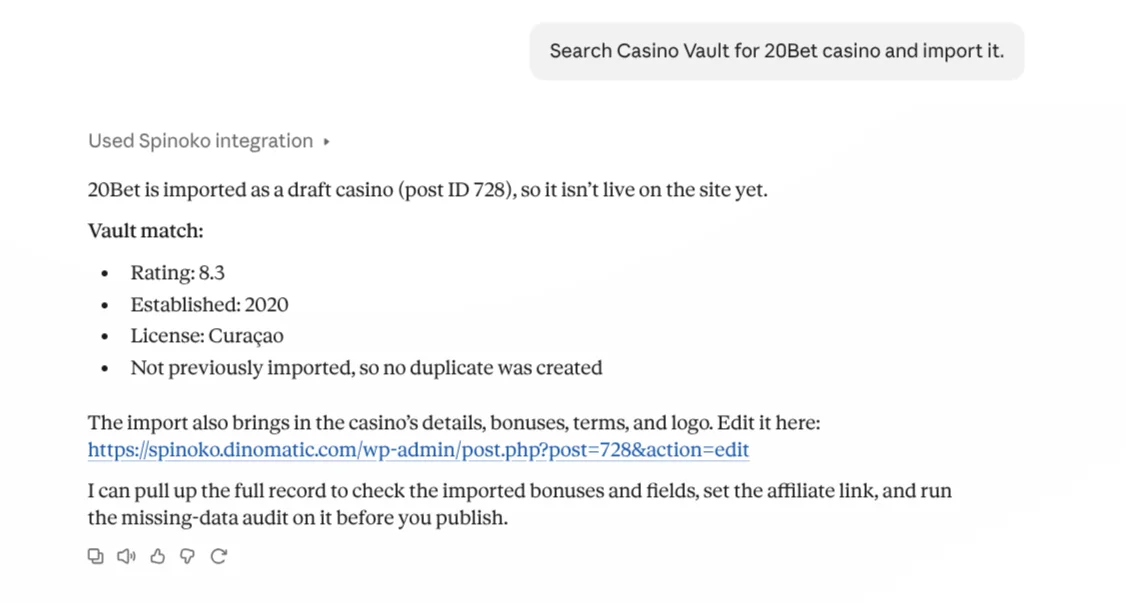
Casino Vault is Spinoko’s built-in database of casinos. Claude searched it and imported 20Bet as a draft, so it is not live on the site. It reported the rating (8.3), the year (2020) and the license (Curaçao), confirmed it had not been imported before so no duplicate was created, and gave me the edit link. It also offered to check the imported bonuses and fields, set the affiliate link and run the missing-data audit before I publish.
Finding slots with no casino to play at
Which slots have no casino to play at?
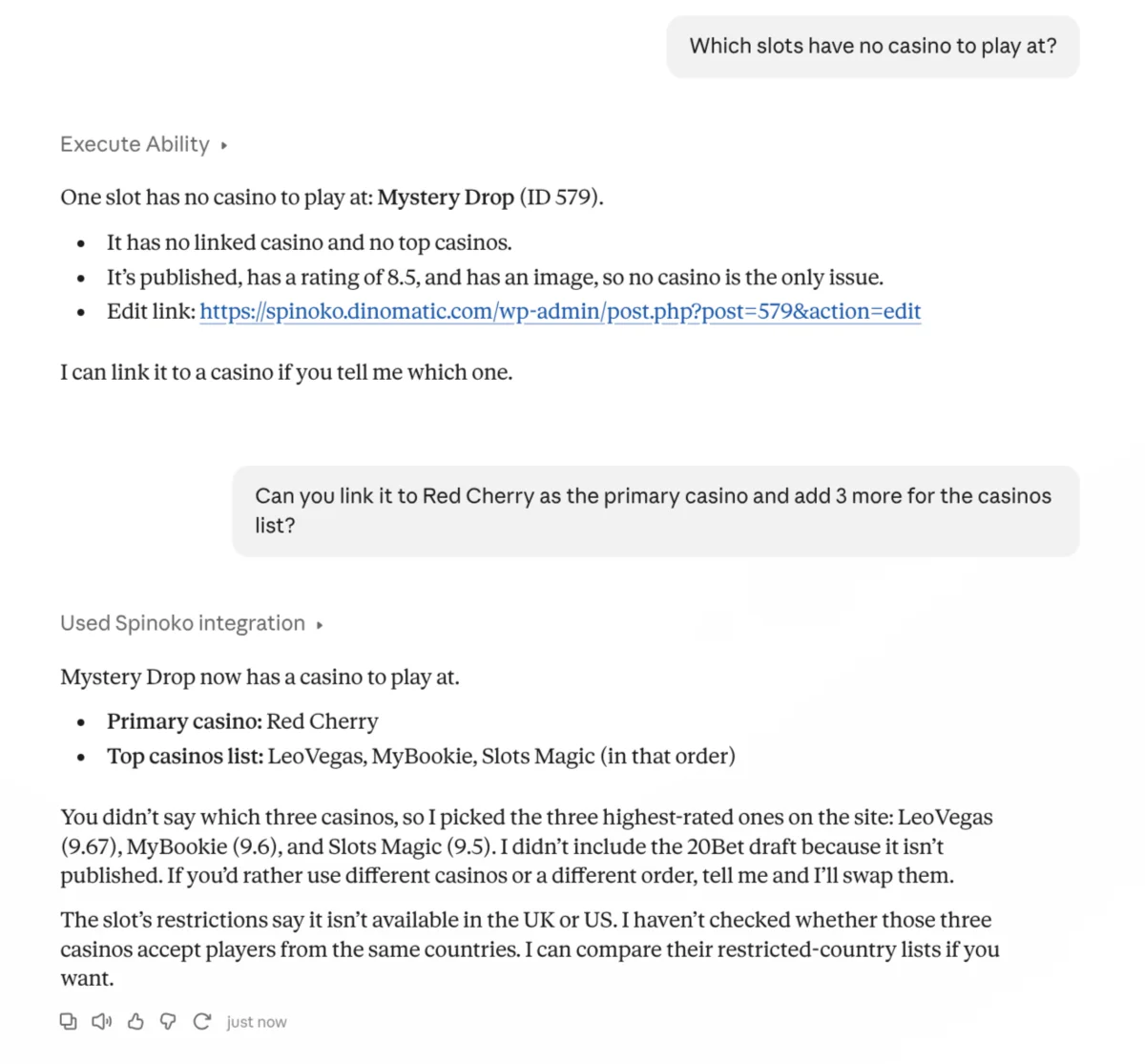
Claude found one: Mystery Drop, published and rated 8.5, but with no linked casino and no top casinos.
I then asked it to link Mystery Drop to Red Cherry as the primary casino and add three more to the list. I did not say which three. Claude picked the three highest-rated published casinos (LeoVegas, MyBookie and Slots Magic), told me it had skipped the 20Bet draft because it is not published, and offered to swap them. It also pointed out that the slot is restricted in the UK and US and that it had not checked whether those three casinos accept players from the same countries.
That last part is what I liked most. It did the job, said what it assumed, and flagged something I would have had to remember myself.
Adding a bonus that already exists
This is the one I was most curious about, because an assistant that blindly saves things can quietly wreck a casino page.
Add a 100 free spins welcome bonus with code SPIN100 to Cherry Jackpot casino. List me all the bonuses Cherry Jackpot offers.
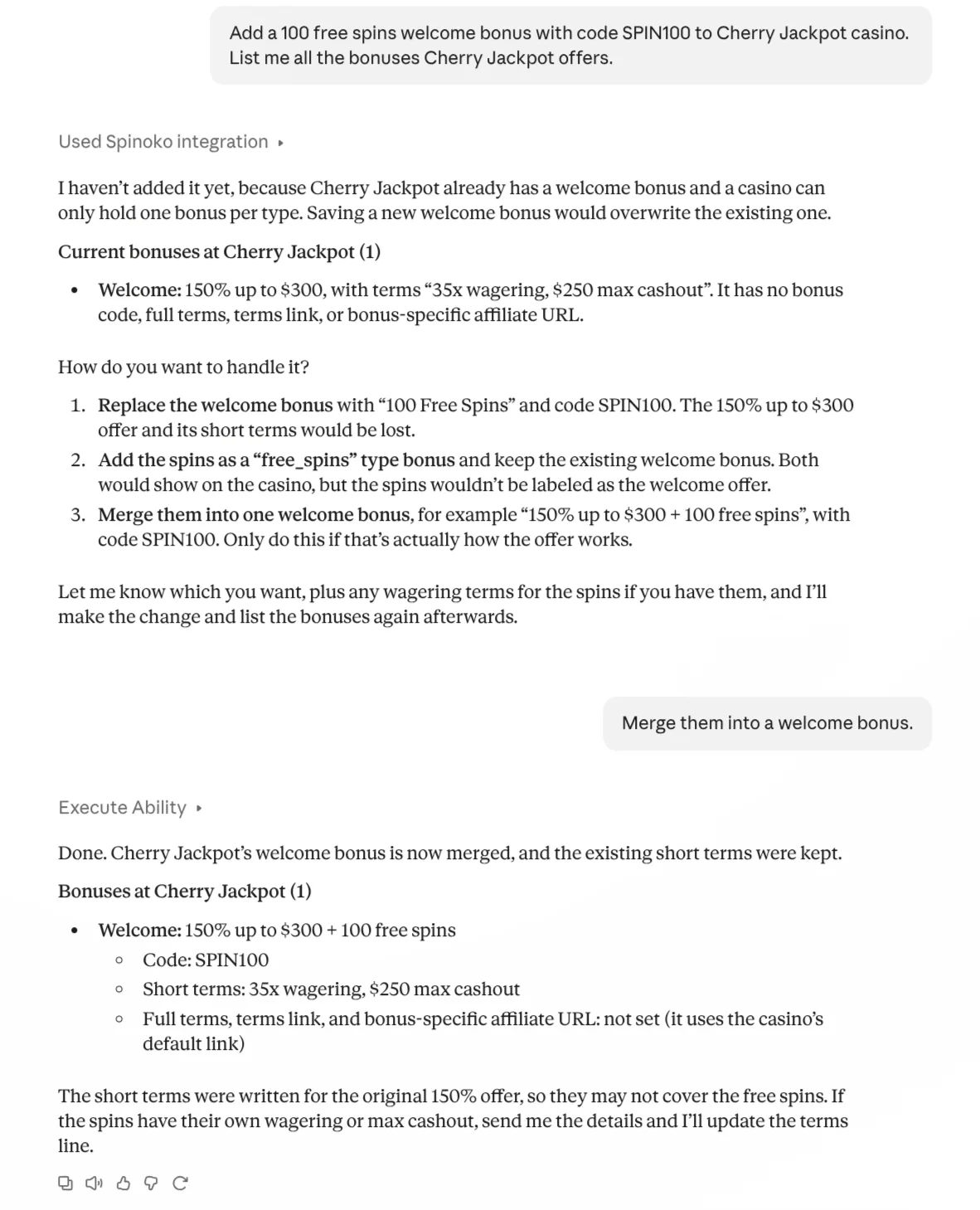
Claude did not add it. It had looked at the casino first and found an existing welcome bonus (“150% up to $300”, with short terms “35x wagering, $250 max cashout”). A casino can only hold one bonus per type, so saving a new welcome bonus would have overwritten the old one.
It gave me three options: replace the bonus, add the spins as a separate free spins bonus, or merge both into one welcome bonus. I chose to merge. The result was “150% up to $300 + 100 free spins” with code SPIN100, and the existing terms were kept. Claude then warned me that those terms were written for the original 150% offer and might not cover the free spins, and asked for the wagering details.
Update theme labels
can you change the “Visit casino” button text to “Play now”?
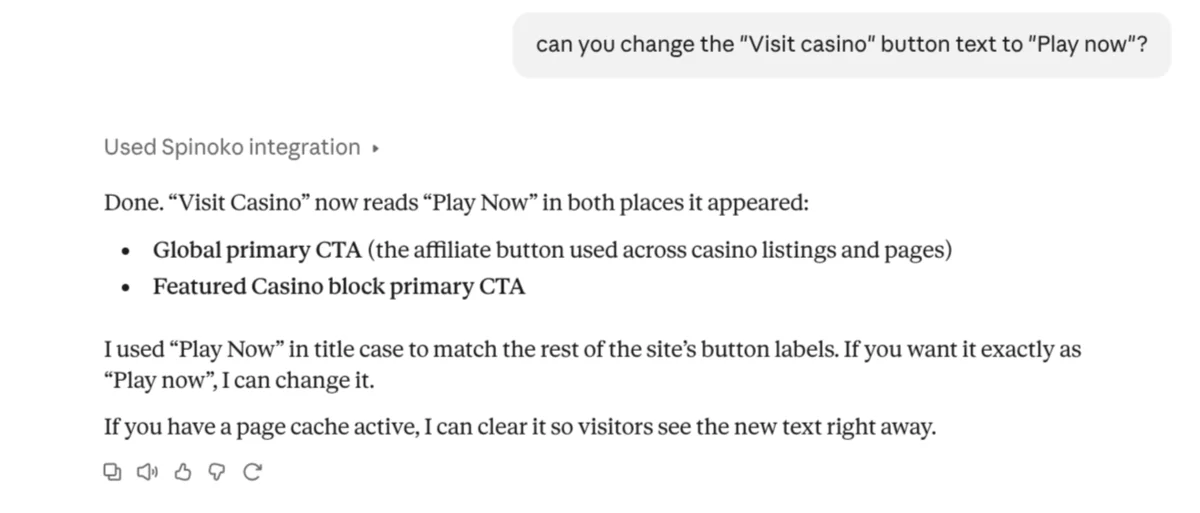
Claude changed the label in both places it was used: the global primary button used across casino listings and pages, and the Featured Casino block button. It used “Play Now” in title case to match the other button labels on the site, said it would change it to “Play now” if I preferred, and offered to clear the page cache so visitors see the new text right away.
What I liked and what to watch
These are just a few examples of the tasks an AI agent can handle on a website using Spinoko theme, it can actually all of the tasks properly.
What I liked was that it checked before it changed things, and tells you what it assumed so you can ask it to double-check. Also it works with the permissions of the WordPress user that signed in. A user with fewer rights gets fewer abilities.
These are real changes on a live website. I was working on a demo, on a production site I would ask Claude to show me what it plans to change before it saves anything.
Read the questions it asks, check the facts it cannot know, turn on only the abilities you need. Check results on the front end after any change it makes.
Try it
If you already use Spinoko, update to 3.2.0, open Spinoko → AI & Abilities and start with the audit abilities. The setup guide takes you through the two plugins. If you are new to it, the Spinoko page has the details, and the demo website shows what it looks like live. For the wider picture of what AI agents can and cannot do on a WordPress site, see my general guide.