DinOdds 1.7: Odds Table Block, New Settings and AI Assistants
DinOdds 1.7.0 adds an Odds Table block with live preview, redesigned settings with site-wide defaults, and AI assistants such as Claude or ChatGPT that can work with your odds tables.
DinOdds 1.7.0 is out. It adds an Odds Table block for the block editor, redesigned settings where you can see where your odds tables are used and set site-wide defaults, a shortcode generator with a preview, and a way to manage your odds tables from an AI chat such as Claude or ChatGPT.
The Odds Table block
Until now you added an odds table with the [odds] shortcode and had to remember its attributes. Now there is a DinOdds Odds block. Pick a league, and the editor shows the real table with your current odds, updating as you change things.
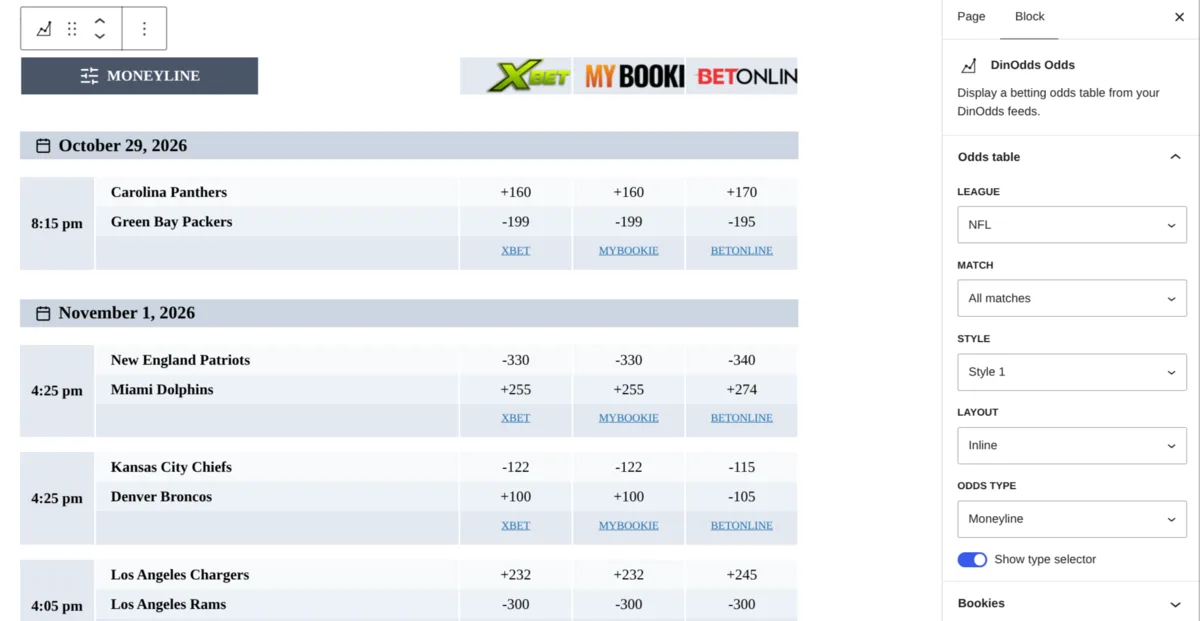
In the sidebar you can:
- choose a league, or a single upcoming match from a list;
- pick the style, the odds type and which sportsbooks to show;
- leave everything else on your site-wide defaults.
If a post already has an [odds] shortcode block, you can convert it to the new block. You don’t have to: shortcodes keep working exactly as before. The block guide has the details.
See where your odds tables are used
The settings now have tabs instead of one long page. The first one, Overview, shows your feed status, when the odds were last updated, your leagues with the number of upcoming matches, and an Update now button.
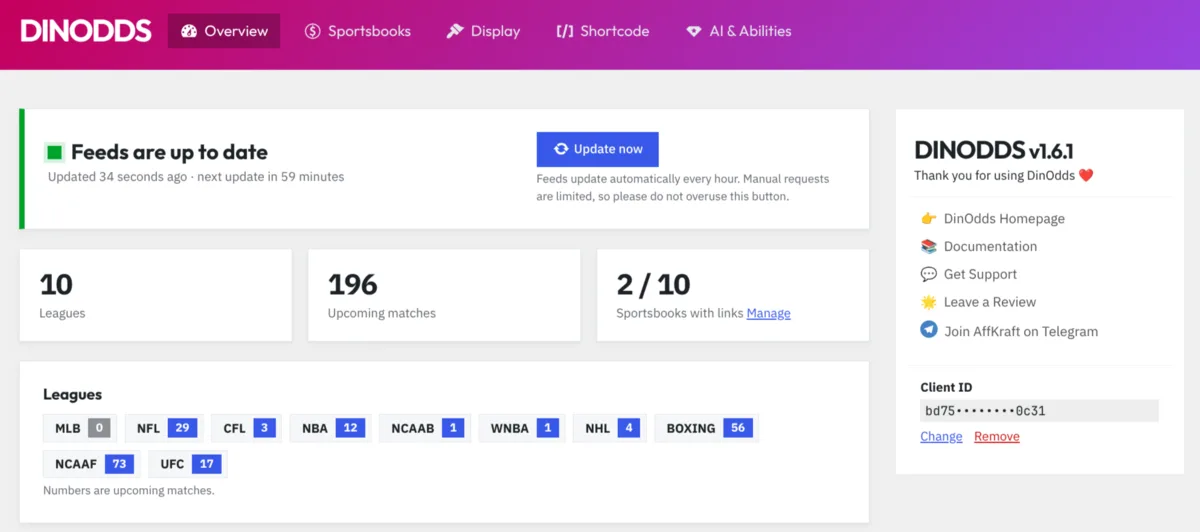
It also lists the posts and pages that use an odds table, whether you added it with the block or the shortcode, with a link to edit each one. When a league goes quiet at the end of its season, you can see straight away which pages show it.
Site-wide defaults, with a preview
On the Display tab you set the defaults for all your tables once: the table style, where the sportsbook links go, the odds type (spread, moneyline or total), whether visitors can switch the odds type, and the highlight colour. A live table next to the settings shows the result as you change them.
Every block and shortcode uses these defaults unless you choose something different for that table. So if you decide your site should show moneyline odds instead of spreads, you change it in one place, not in every post.
Shortcode generator, with a preview
If you prefer shortcodes, or your page builder needs them, the Shortcode tab builds one for you. Choose the league, the sportsbooks and the other options, and you see the table it will produce before you copy it. For a single match you pick it from the list of upcoming games instead of typing the team names.
The Sportsbooks tab is new too: set each sportsbook’s logo from your Media Library, its affiliate link, and whether the link opens in a new tab and is marked as sponsored, then drag the sportsbooks into the order you want in your tables.
Manage odds with AI
The new AI & Abilities tab lets an AI assistant such as Claude or ChatGPT work with DinOdds on your website. The assistant can’t click around your dashboard. Instead, DinOdds gives it a set of specific tasks, called abilities, and it can’t do anything outside them. They come in groups:
- Odds data: list your leagues, sportsbooks and upcoming games, read the current odds for a league or a single match, and check the feed status.
- Content: add an odds table to a new or existing draft (at the start, at the end or after a heading), find the posts that use odds tables, and change the settings of a table in a draft.
- Display settings: read and change your site-wide defaults.
- Sportsbooks: read and change sportsbook logos and affiliate links, and their order.
- Feed refresh: fetch fresh odds now, at most once every 5 minutes.
Everything is off until you switch it on, and you can switch groups or single abilities on and off. Sportsbooks and Feed refresh stay off even then, until you turn them on yourself, because affiliate links decide who earns the commission.
The assistant only adds or changes odds tables in drafts and pending posts. It never touches a published post, it can’t publish anything, and your client ID is never shown to it. It also can’t change which sportsbooks your feed includes: that’s set in your AffKraft account.
You need WordPress 6.9 or newer and two free plugins, MCP Adapter and Enable Abilities for MCP. The tab shows whether they are installed and active, and links to them. I explained the general setup in my guide to managing WordPress with AI agents, so I won’t repeat it here. The DinOdds steps are in the AI documentation.
Some things you can ask:
Which leagues have upcoming games, and how many?
Is the odds feed up to date?
What are the moneyline odds for the next Lakers game?
Add the NFL odds table to a new draft called “Week 9 picks”.
In draft 482, add the NBA odds table after the heading “Tonight’s games”.
Which posts use odds tables, and which leagues do they show?
In my “Week 9 picks” draft, show only BetOnline and Bovada in the odds table.
Make moneyline the default odds type and hide the odds type selector.
With Sportsbooks and Feed refresh switched on:
Set the BetUS affiliate link to https://example.com/betus and open it in a new tab.
Put Bovada first in my odds tables.
Refresh the odds now.
As with any AI change, ask it to show you what it plans to do first, and check the draft before you publish it.
Try it
Update to DinOdds 1.7.0 from your Plugins screen, add an Odds Table block to your next post, and switch on AI & Abilities to let your assistant do the rest. New to DinOdds? See what it can do or read the AI setup guide.